1. 回调函数定义
回调函数是用于接收模型实时输出的结果。在初始化 RKLLM 时回调函数会被绑定,在模型推理过程中不断将结果输出至回调函数中,并且每次回调只返回一个 token。
示例代码如下,该回调函数将输出结果实时地打印输出到终端中:
int callback(RKLLMResult* result, void* userdata, LLMCallState state) { if(state == LLM_RUN_NORMAL){ printf("%s", result->text); } if (state == LLM_RUN_FINISH) { printf("finish\n"); } else if (state == LLM_RUN_ERROR){ printf("\run error\n"); } return 0; }
(1)LLMCallState 是一个状态标志,其具体定义如下:
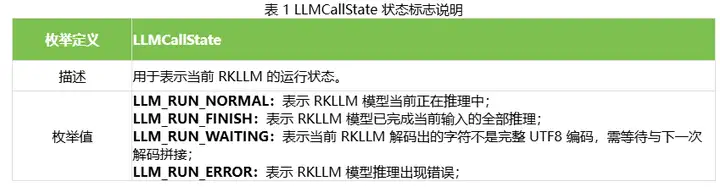
用户在回调函数的设计过程中,可以根据 LLMCallState 的不同状态设置不同的后处理行为。
(2)RKLLMResult 是返回值结构体,其具体定义如下:
(3)RKLLMResultLogits 是返回值结构体,其具体定义如下:
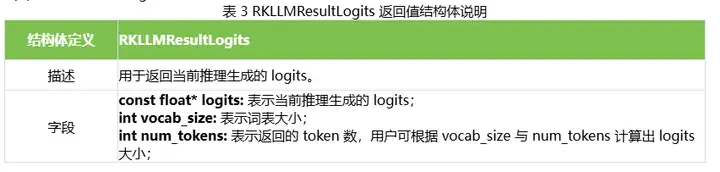
用户在回调函数的设计过程中,可以根据 RKLLMResult 中值设置不同的后处理行为。
2. 参数结构体 RKLLMParam 定义
结构体 RKLLMParam 用于描述、定义 RKLLM 的详细信息,具体的定义如下:
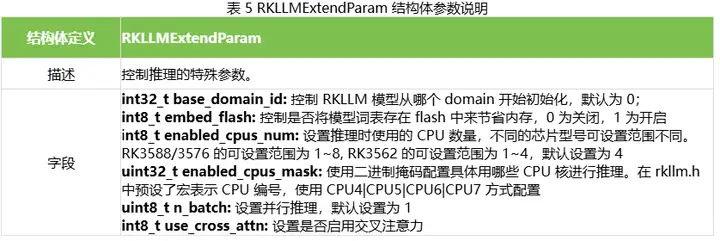
在实际的代码构建中,RKLLMParam 需要调用 rkllm_createDefaultParam()函数来初始化定义,并根据需求设置相应的模型参数。示例代码如下
RKLLMParam param = rkllm_createDefaultParam(); param.model_path = "model.rkllm"; param.top_k = 1; param.max_new_tokens = 256; param.max_context_len = 512;
3. 输入结构体定义
为适应不同的输入数据,定义了 RKLLMInput 输入结构体,目前可接受文本、图片和文本、Token id 以及编码向量四种形式的输入,具体的定义如下:
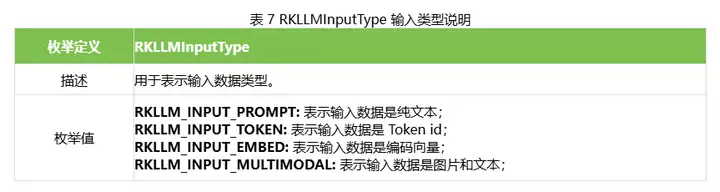
当输入数据是纯文本时,使用 input_data 直接输入;当输入数据是 Token id、编码向量以及图 片和文本时,RKLLMInput 需要搭配RKLLMTokenInput, RKLLMEmbedInput 以及RKLLMMultiModelInput 三个输入结构体使用,具体的介绍如下:
(1)RKLLMTokenInput 是接收 Token id 的输入结构体,具体的定义如下:

(2)RKLLMEmbedInput 是接收编码向量的输入结构体,具体的定义如下:

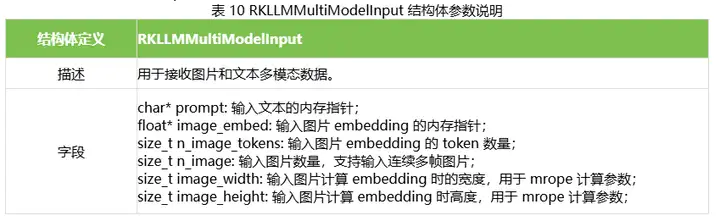
(3)RKLLMMultiModelInput 是接收图片和文本的输入结构体,具体的定义如下:
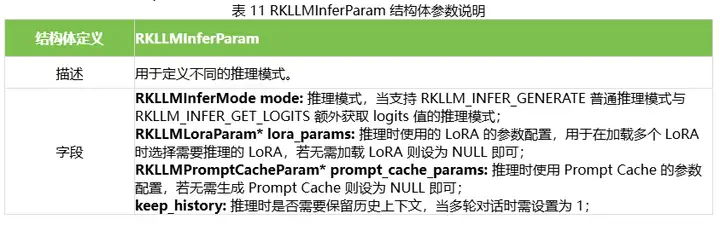
RKLLM 支持不同的推理模式,定义了 RKLLMInferParam 结构体,目前可支持在推理过程与预加载的 LoRA 模型联合推理,或保存 Prompt Cache 用于后续推理加速,具体的定义如下:

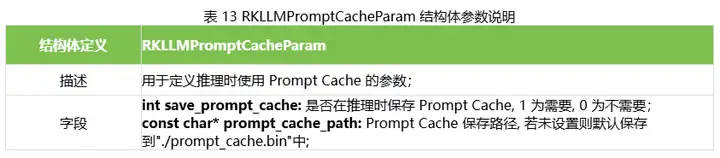
使用 RKLLMPromptCacheParam 的示例如下:
//初始化并设置 Prompt Cache 参数(如果需要使用 prompt cache) RKLLMPromptCacheParam prompt_cache_params; prompt_cache_params.save_prompt_cache = true; // 是否保存 prompt cache prompt_cache_params.prompt_cache_path = "./prompt_cache.bin"; // 若需要保存 prompt cache, 指定 cache 文件路径 rkllm_infer_params.prompt_cache_params = &prompt_cache_params;
4. 初始化模型
在进行模型的初始化之前,需要提前定义 LLMHandle 句柄,该句柄用于模型的初始化、推理和资源释放过程。注意,正确的模型推理流程需要统一这 3 个流程中的 LLMHandle 句柄对象。在模型推理前,用户需要通过 rkllm_init()函数完成模型的初始化,具体函数的定义如下:
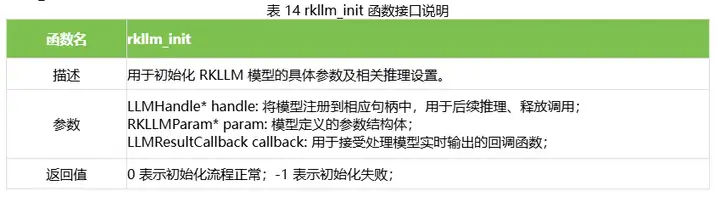
示例代码如下:
LLMHandle llmHandle = nullptr; rkllm_init(&llmHandle, ¶m, callback);
5. 模型推理
用户在完成 RKLLM 模型的初始化流程后,即可通过 rkllm_run()函数进行模型推理,并可以通过初始化时预先定义的回调函数对实时推理结果进行处理;rkllm_run()的具体函数定义如下:
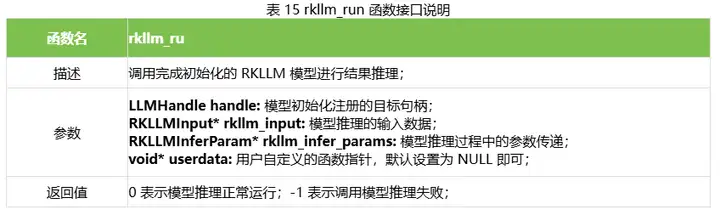
6. 模型中断
在进行模型推理时,用户可以调用 rkllm_abort()函数中断推理进程,具体的函数定义如下:
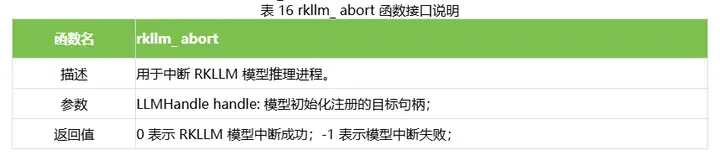
示例代码如下:
// 其中 llmHandle 为模型初始化时传入的句柄 rkllm_abort(llmHandle);
7. 释放模型资源
在完成全部的模型推理调用后,用户需要调用 rkllm_destroy()函数进行 RKLLM 模型的销毁,并释放所申请的 CPU、NPU 计算资源,以供其他进程、模型的调用。具体的函数定义如下:
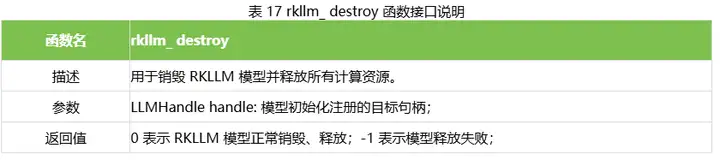
示例代码如下:
// 其中 llmHandle 为模型初始化时传入的句柄 rkllm_destroy(llmHandle);
8. LoRA 模型加载
RKLLM 支持在推理基础模型的同时推理 LoRA 模型,可以在调用 rkllm_run接口前通过rkllm_load_lora接口加载LoRA模型。RKLLM支持加载多个LoRA 模 型,每调用一次rkllm_load_lora 可加载一个 LoRA 模型。具体的函数定义如下:
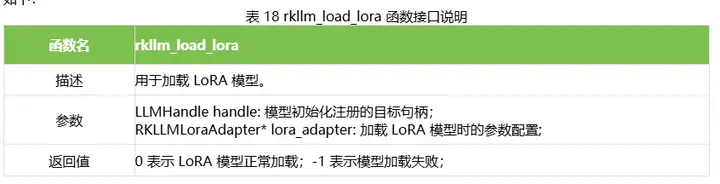
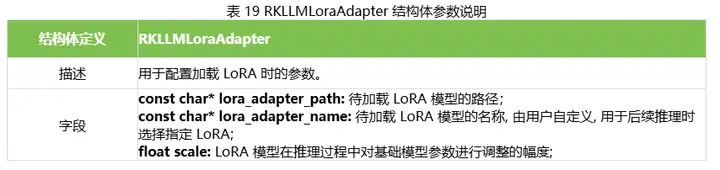
加载 LoRA 的示例代码如下:
RKLLMLoraAdapter lora_adapter; memset(&lora_adapter, 0, sizeof(RKLLMLoraAdapter)); lora_adapter.lora_adapter_path = "lora.rkllm"; lora_adapter.lora_adapter_name = "lora_name"; lora_adapter.scale = 1.0; ret = rkllm_load_lora(llmHandle, &lora_adapter); if (ret != 0) { printf("\nload lora failed\n"); }
9. Prompt Cache 管理
在模型推理过程中,Prefill 阶段通常消耗大量的计算资源和时间,特别是在 Prompt 很长的情况下。为了加速这一过程,RKLLM 支持文件加载 Prompt Cache,通过复用缓存中的内容,可以显著减少 Prefill 阶段的耗时,从而提升整体推理效率。在调用 rkllm_run 接口进行推理之前,请确保正确配置 prompt_cache_params 参数。这一步骤允许模型在推理结束后生成对应的 Prompt Cache 文件。当首次运行推理时,系统会自动生成一个 Prompt Cache 文件。该文件包含了 Prefill 阶段所需的中间结果,以便后续使用。在后续的推理任务中,可以通过调用 rkllm_load_prompt_cache 接口加载之前生成的 Prompt Cache 文件。
具体的函数定义如下:
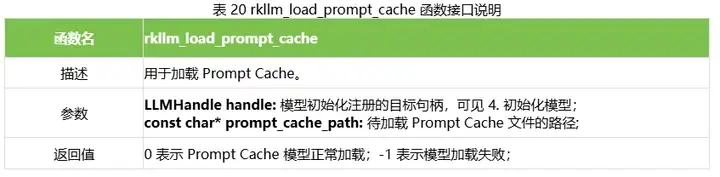
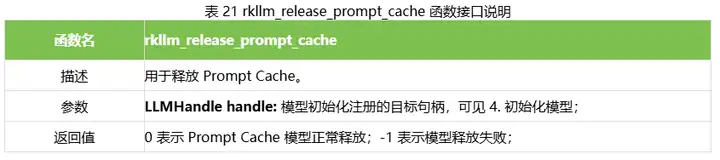
注意:
RKLLM 会从头开始检测输入与 prompt_cache 中相同的部分,假设您的输入格式固定为PROMPT_PREFIX + text + PROMPT_POSTFIX,您可以仅对 PROMPT_PREFIX 部分生成Prompt Cache,加载后在后续的推理中即可复用这部分结果。
RKLLM 支持生成多个 Prompt Cache 文件。在需要使用不同的 Prompt Cache 时,只需加载对应的文件即可。当需要切换到另一个 Prompt Cache 文件或不再需要使用加载的 PromptCache 时,请显式调用 rkllm_release_prompt_cache 接口进行释放。
加载 Prompt Cache 的示例代码如下:
// 初始化并设置 Prompt Cache 参数,并调用 run 接口生成 prompt cache 文件 RKLLMPromptCacheParam prompt_cache_params; // 是否保存 prompt cache prompt_cache_params.save_prompt_cache = true; // 若需要保存 prompt cache, 指定 cache 文件绝对路径 prompt_cache_params.prompt_cache_path = "/data/prompt_cache.bin"; rkllm_infer_params.prompt_cache_params = &prompt_cache_params; rkllm_infer_params.mode = RKLLM_INFER_GENERATE; rkllm_input.input_type = RKLLM_INPUT_PROMPT; rkllm_input.prompt_input = (char *)prompt.c_str(); rkllm_run(llmHandle, &rkllm_input, &rkllm_infer_params, NULL); // 加载 prompt cache 文件,减少 prefill 耗时 rkllm_load_prompt_cache(llmHandle, "./prompt_cache.bin"); if (ret != 0) { printf("\nload Prompt Cache failed\n"); } rkllm_run(llmHandle, &rkllm_input, &rkllm_infer_params, NULL);
10. KV Cache 管理
RKLLM 支持手动清除 KV 缓存,可用于单轮和多轮对话。在调用清除缓存功能时,如果keep_system_prompt 设置为 1,则会保留系统提示词(如果存在);否则,将清空整个缓存。函数定义如下:
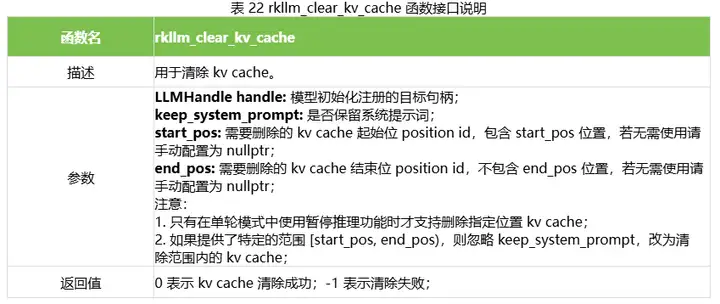
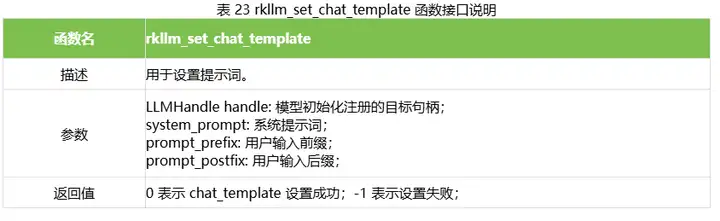
11. Chat Template 设置
当用户使用文本输入时,RKLLM 会对默认文本进行前处理,前处理时会根据 Hugging Face模型 tokenizer_config.json 文件中的 chat_template 字段,自动解析并应用提示词模板。如需自定义,可使用以下函数进行重置,其中,system_prompt 作为系统提示词,用于指导模型行为,prompt_prefix 为用户输入前缀,prompt_postfix 为用户输入后缀,具体的函数定义如下。当用户重置模板后,enable_thinking 选项将失效,用户需要在自定义的 prompt 中进行配置。
12. Function Calling 设置
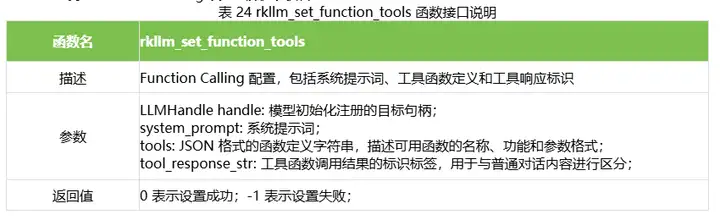
RKLLM 支持通过 Function Calling 实现模型与外部系统的结构化交互,扩展大模型能力边界,提升模型在知识补充、数据精确获取等任务中的表现。当启用 Function Calling 模式后,应用程序可将函数定义传入模型,模型根据用户提问判断是否需要调用函数,并根据设定的格式输出调用请求。应用程序根据模型意图调用相应函数并将结果返回,模型最终基于结果继续对话。
RKLLM 支持的 Function Calling 设置函数定义如下:
示例代码如下: 首先配置 tools std::string system_prompt = "You are Qwen, created by Alibaba Cloud. You are a helpful assistant.\n\nCurrent Date: 2024-09-30"; std::string tools = R"([ { "type": "function", "function": { "name": "get_current_temperature", "description": "Get current temperature at a location.", "parameters": { "type": "object", "properties": { "location": { "type": "string", "description": "The location to get the temperature for, in the format "City, State, Country"." }, "unit": { "type": "string", "enum": ["celsius", "fahrenheit"], "description": "The unit to return the temperature in. Defaults to "celsius"." } }, "required": ["location"] } } }, { "type": "function", "function": { "name": "get_temperature_date", "description": "Get temperature at a location and date.", "parameters": { "type": "object", "properties": { "location": { "type": "string", "description": "The location to get the temperature for, in the format "City, State, Country"." }, "date": { "type": "string", "description": "The date to get the temperature for, in the format "Year-Month-Day"." }, "unit": { "type": "string", "enum": ["celsius", "fahrenheit"], "description": "The unit to return the temperature in. Defaults to "celsius"." } }, "required": ["location", "date"] } } } ])"; rkllm_set_function_tools(llmHandle, system_prompt.c_str(), tools.c_str(), "tool_response");
接下来,在推理过程中配合 rkllm_run 实现调用链:
// 用户提问 RKLLMInferParam rkllm_infer_params; memset(&rkllm_infer_params, 0, sizeof(RKLLMInferParam)); rkllm_infer_params.mode = RKLLM_INFER_GENERATE; rkllm_infer_params.keep_history = 0; RKLLMInput rkllm_input; rkllm_input.input_type = RKLLM_INPUT_PROMPT; rkllm_input.enable_thinking = false; rkllm_input.role = "user"; rkllm_input.prompt_input = "What's the temperature in San Francisco now? How about tomorrow?"; rkllm_run(llmHandle, &rkllm_input, &rkllm_infer_params, NULL); // 第一次调用 rkllm_run 会返回需要调用的工具函数名 {"name": "get_current_temperature", "arguments": {"location": "San Francisco"}} {"name": "get_temperature_date", "arguments": {"location": "San Francisco", "date": "2024-10-01"}} // 将工具调用结果返回给大模型,role 必须配置为 tool rkllm_input.role = "tool"; rkllm_input.prompt_input = R"([ { "temperature": 26.1, "location": "San Francisco", "unit": "celsius" }, { "temperature": 25.9, "location": "San Francisco", "date": "2024-09-30", "unit": "celsius" } ])"; rkllm_run(llmHandle, &rkllm_input, &rkllm_infer_params, NULL); // 最终结果 "The current temperature in San Francisco is 26.1°C. Tomorrow, the temperature is expected to be 25.9°C."
13. Cross attention 设置
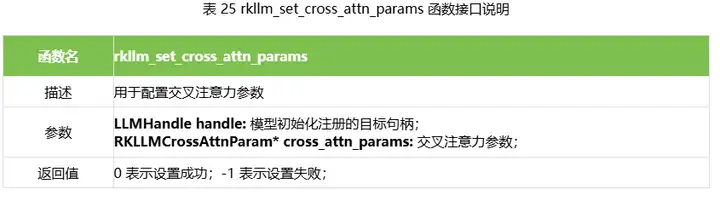
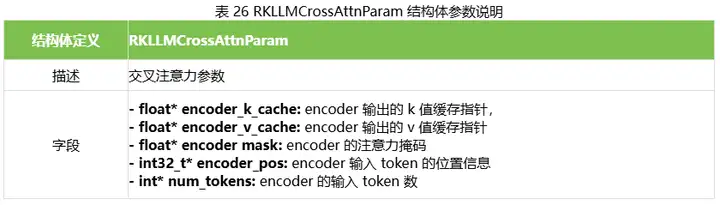
RKLLM 支持 cross attention 推理,用户可以通过如下函数将 encoder 生成的 K/V 缓存、掩码以及位置信息输入给解码器用于交叉注意力计算。cross attention 只支持自定义模型推理,模型的转换方式详见 3.1.6 章节。
14. 多 batch 并行推理
RKLLM 支持同时推理多个 batch(建议 batch 数量不超过 8)。
使用两个 batch 进行推理的示例代码如下,主要为:
- 模型初始化时需要将 param.extend_param.n_batch 参数设置为 2;
- 使用多 batch 进行推理时,输入 RLLLMInput 和 callback 中的 RKLLMResult 均为n_batch 大小的数组;
- callback 中所有 batch 推理结果同步返回,当某个 batch 返回的 token id 为负数时,表示该 batch 推理结束,所有 batch 都推理结束时才会终止推理;
- 在 callback 中处理返回的文本时,必须先判断返回的 text 是否为空指针,再进行赋值操作。
#include #include #include #include "rkllm.h" #include #include #include #include using namespace std; LLMHandle llmHandle = nullptr; std::string output_texts[10]; int callback(RKLLMResult *result, void *userdata, LLMCallState state) { if (state == RKLLM_RUN_FINISH) { printf("\nrkllm run finish\n"); } else if (state == RKLLM_RUN_ERROR) { printf("\nrkllm run error\n"); } else if (state == RKLLM_RUN_NORMAL) { RKLLMResult batch1 = result[0]; RKLLMResult batch2 = result[1]; if (batch1.text) { output_texts[0] += batch1.text; printf("batch 0 %s\n", output_texts[0].c_str()); } if (batch2.text) { output_texts[1] += batch2.text;; printf("batch 1 %s\n", output_texts[1].c_str()); } } return 0; } int main(int argc, char **argv) { if (argc < 4) { std::cerr << "Usage: " << argv[0] << " model_path max_new_tokens max_context_len\n"; return 1; } RKLLMParam param = rkllm_createDefaultParam(); param.model_path = argv[1]; param.top_k = 1; param.top_p = 0.95; param.temperature = 0.8; param.repeat_penalty = 1.1; param.frequency_penalty = 0.0; param.presence_penalty = 0.0; param.max_new_tokens = std::atoi(argv[2]); param.max_context_len = std::atoi(argv[3]); param.skip_special_token = true; param.extend_param.base_domain_id = 0; param.extend_param.embed_flash = 1; param.extend_param.n_batch = 2; int ret = rkllm_init(&llmHandle, ¶m, callback); if (ret == 0){ printf("rkllm init success\n"); } else { printf("rkllm init failed\n"); exit_handler(-1); } RKLLMInput rkllm_input[2]; memset(&rkllm_input, 0, sizeof(RKLLMInput)*2); RKLLMInferParam rkllm_infer_params; memset(&rkllm_infer_params, 0, sizeof(RKLLMInferParam)); // 将所有内容初始化为 0 output_texts[0].clear(); output_texts[1].clear(); rkllm_infer_params.mode = RKLLM_INFER_GENERATE; rkllm_infer_params.keep_history = 0; rkllm_input[0].input_type = RKLLM_INPUT_PROMPT; rkllm_input[0].role = "user"; rkllm_input[0].enable_thinking = false; rkllm_input[0].prompt_input = "上联: 江边惯看千帆过"; rkllm_input[1].input_type = RKLLM_INPUT_PROMPT; rkllm_input[1].role = "user"; rkllm_input[1].enable_thinking = false; rkllm_input[1].prompt_input = "以咏梅为题目,帮我写一首古诗,要求包含梅花、白雪等元素。"; printf("robot: "); rkllm_run(llmHandle, &rkllm_input[0], &rkllm_infer_params, NULL); rkllm_destroy(llmHandle); return 0; }
15. 模型暂停推理
RKLLM 支持在单轮模式中暂停推理,具体为在 callback 中 return 1。暂停推理时,kv cache不会被清除,用户可以继续更改输入后,调用 rkllm_run 恢复推理。
16. 模型性能数据回调
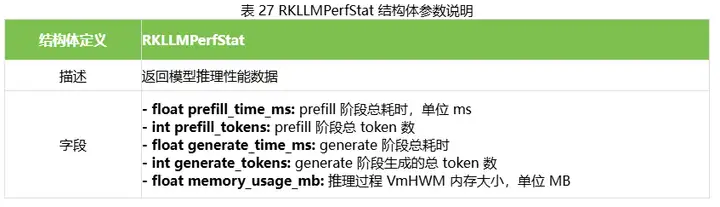
RKLLM 支持在推理结束时返回单次推理性能数据,包括 prefill 和 decode 推理总耗时、token数量和内存占用,返回的结构体定义如下:
- 随机文章
- 热门文章
- 热评文章
- 中国每百万人心脏电生理手术量只有美国1/10,问题在哪儿
- 曝华为Mate70系列将搭载完全体HarmonyOS NEXT
- Vision Pro用户称佩戴后出现健康问题:头痛、黑眼圈、颈部酸痛
- 这事儿|九龄童玩游戏充值上万父亲自扇耳光:如何教育更妥当
- 美元走强削弱美豆竞争力,大豆价格徘徊在四年低点附近
- 嘉兴“科教融合”贯穿青少年教育全过程 在孩子心中,种下科学火种
- 台州人家门口可以做什么?15分钟,1200多个“圈”
- 钉钉正式上线AI助理市场AI月活企业已超170万家
- 白银投资者犹豫不决,短期内面临盘整或回调
- 认购500万佛坪特色农产品??中国平安以"党建+消费帮扶"模式带动乡村振兴
- 蓝厅观察丨菲律宾威胁提起新一轮仲裁 胡搅蛮缠 毫无意义
- 这个春天儿子身高蹿到1米83,体重涨到78公斤 没想到中考跳绳项目发生意外
- 益佰制药疏肝益阳胶囊入选米内网2023年度壮腰健肾中成药产品TOP10 销售过亿元位列第五大品种
- 1“赛事+”提升城市“流量” 陕西商洛拓经济发展新“赛道”
- 2“五一”临近 持基过节的投资者要注意这几点
- 3华发股份:成功入选“人民优选”品牌 五一黄金周热销30亿
- 4到2027年产业规模达到2000亿元 浙江发布历史经典产业高质量发展计划
- 5钟鼓楼老街区的古都新事
- 6IDC:24Q1全球PC出货量恢复增长 达到疫情前水平
- 7非常危险!女子摔成粉碎性骨折!又是因为洞洞鞋,夏天多人中招……
- 8金税四期试点上线,财税体制改革拉开帷幕!或有资金借道信创ETF基金(562030)逢跌进场布局
- 9初步数据:我国一季度经常账户顺差392亿美元
- 10“发现山西之美”TDC旅游发现者大会举办:共话文旅新生态 邀客体验新玩法
- 11国门“夫妻档” 国庆共坚守
- 12北交所一周审核动态:2家企业更新进展 胜业电气二轮问询回复中称家电头部客户对价格敏感度较低
- 13甘肃白银县域经济:从“一枝独秀”到“多点开花”
- 1大裁员下,特斯拉两名顶级高管离职
- 2奇瑞将与欧洲高端品牌签署技术平台授权协议
- 32024中国长三角青年企业家交流大会在杭州举办
- 4雷克萨斯GX中东版 全部在售 2023款 2022款 2020款 2019款 2018款成都远卓名车雷克萨斯GX中东版团购钜惠20万 欢迎上门试驾
- 5零跑C16将搭载中创新航磷酸铁锂电池
- 6Q1净利微增7%,宁德时代股东总数较2023年年末减少10728户
- 7哪吒,需要背水一战
- 8“新”中有“机”!创新服务承接新流量 撬动消费升级
- 9非创始版SU7何时交付 小米:工厂生产爬坡 全力提高产能
- 10央媒评卧铺挂帘:谁买的票谁做主
- 11江西南昌首部“多规合一”国土空间总体规划获批
- 12方程豹旗舰硬派越野!豹8正式亮相:仰望U8“青春版”登场
- 13583家族/造型霸气 方程豹豹8量产版发布